 ™
™RDF4J includes a Maven-integrated script that reports the update status of all external dependencies across the multi-module build. It queries Maven Central directly and prints two tables: one grouped by version status, and one for dependencies that have been re-released under different Maven coordinates.
From the project root, run:
mvn -N -P dependency-updates validate
The -N flag (non-recursive) is required so Maven only processes the root POM
and the report is printed once.
In this document the Eclipse RDF4J project workflow and developer best practices are explained. It contains information on how to create branches, tag releases, manage pull requests, create and schedule issues, and so on.
RDF4J values a clean but accurate commit history on our main branches, where commits are meaningfully described and linked back to the issue that they address. To achieve this, we merge everything using merge-commits, and we may ask you to squash your pull request branch before we merge it.
This document outlines how to create a new release of RDF4J.
When submitting a pull request to RDF4J, we sometimes ask that you squash your commits, to clean up the commit history a bit. Here we explain a simple way to do that.
The docker/ directory contains scripts and a Docker Compose setup for building and running RDF4J Server and Workbench locally. All commands below are run from that directory.
cd docker
The simplest way to build and start everything in one step:
./run.sh
This script will:
build.sh to build the Maven project and produce the SDK ZIPignore/rdf4j.zip (required by the Dockerfile)docker compose builddocker compose upOnce ready, the output will confirm:
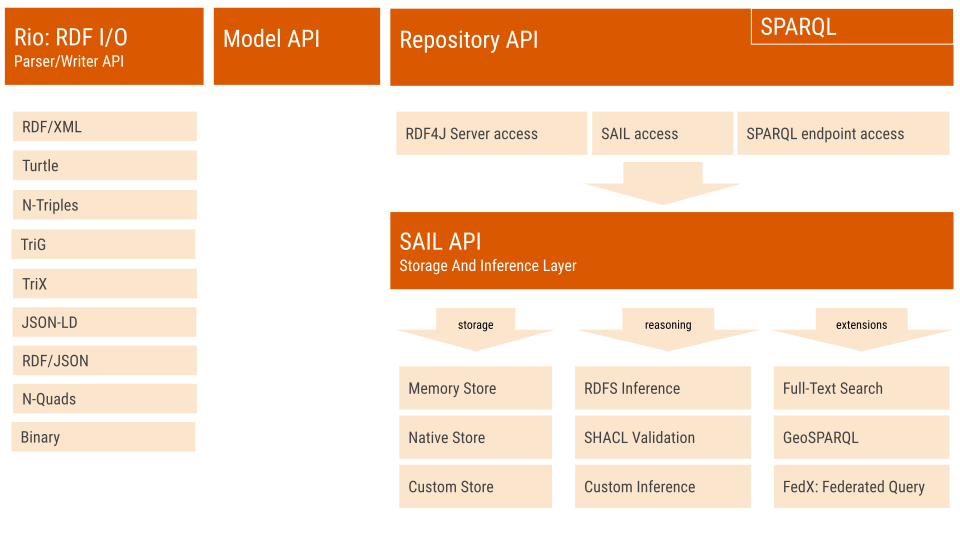
Eclipse RDF4J™ is a powerful Java framework for processing and handling RDF data. This includes creating, parsing, scalable storage, reasoning and querying with RDF and Linked Data. It offers an easy-to-use API that can be connected to all leading RDF database solutions. It allows you to connect with SPARQL endpoints and create applications that leverage the power of linked data and Semantic Web.